Showing posts with label VSCode. Show all posts
Showing posts with label VSCode. Show all posts
Visual studio and VS Code shortcuts side by side, Daily useful command
Below is useful list keyboard short cuts of
Visual Studio and VS Code, which I am using in my daily work J
|
Visual Studio |
Visual Studio Code |
Description |
|
Ctrl + , |
Ctrl + P |
Navigation or go
to File |
|
Ctrl + K + D |
Shift + Alt + F |
Format Code |
|
Ctrl + X |
Ctrl + X |
to remove a line |
|
|
Ctrl + ` |
toggle terminal |
|
Ctrl + F5 |
|
Run/Start without
debug To reflect new
changes just build and refresh browser |
|
Ctrl + Shift + B |
|
Build |
|
|
|
|
How to debug Angular app in Visual Studio Code
To debug Angular app into Visual Studio Code Please flow below step:
Note: These are only one time activity
Lets start your Code Editor
Step 1 - Goto Extension options OR Press - Ctrl + Shift + X

Step 2 - Type on Search - "Debugger for Chrome"
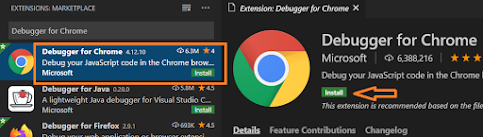
Step 4 - Now Press F5 and Select Chrome from option list

"url": "http://localhost:4200"
That's it. you are ready to debug your angular app.
Remember run your app with ng serve command.

Now put break point where ever you want (before row number) and enjoy!!!
Subscribe to:
Posts
(
Atom
)


